TREBEL: Music, MP3 & Podcasts
- 4.7
- Rating
- 50.00M
- Installs
- Free
- Price

 Analysis by App-foxy
I approached TREBEL as someone looking for a practical way to keep music available when a connection is unreliable, rather than as a replacement for every audio service on my phone. It is a free music and audio app from M&M Media, Inc., aimed at listeners who want offline playback, song discovery, playlists, and an MP3-style player in one place. After spending time with it, my view is fairly clear: it is most appealing when control over listening access matters more to you than having the most polished ecosystem.
The app has a Teen content rating and runs on Android versions from 7.0 onward. Its current version is 7.1.6, and its popularity is easy to understand: it has passed 50 million installs, with a 4.8 average from around 1.6 million ratings and roughly 83 thousand written reviews. Those figures do not automatically make it right for everyone, but they do show that TREBEL is not a niche experiment. It is an established option for people who want music available beyond the usual streaming routine.
How I would decide whether TREBEL fits
My first question would be simple: what do you actually need from a music app? If your priority is pressing play on a large, familiar catalog with minimal setup, your decision may lean toward a conventional streaming service. If your priority is saving music for offline listening, finding playlists without building everything yourself, and using an uncomplicated audio player, TREBEL deserves a closer look.
You May Also Like

 Blood Strike: 2.5 Anniversary
Blood Strike’s Loadouts Turn Every Drop Into a Tactical Gamble
A close look at Blood Strike’s custom loadouts: how fast access to signature weapons reshapes its battle royale rhythm, rewards preparation, and narrows the gap between fights.

 Pandora - Music & Podcasts
Pandora’s Music Is Easy to Start, but Harder to Recover
Pandora’s strength is its low-effort path from a seed to a station. Its weak spot is how much confidence it asks you to place in connection, setup, and quiet recovery.

 8 Ball Pool
 Is Built on Rivalries, Rematches, and Routine
A close look at the rivalries, rematches, shared routines, and unanswered safety questions that turn a quick pool match into a persistent mobile community.

 Samsung Music
’s Quiet Strength Is Playing What You Already Own
Its reach comes less from spectacle than from dependable access to a personal library. That simplicity is both the app’s strongest retention engine and its ceiling.

 AccuWeather: Weather Radar
AccuWeather Review: A Quick, Clear Forecast for Everyday Decisions
For everyday plans, the best forecast is the one you can understand quickly. AccuWeather makes rain timing, radar, and local conditions easy to act on, with a few trade-offs.

 Hill Climb Racing
Why Hill Climb Racing Still Turns Crashes Into One More Run
A tiny car, a bumpy hill and one more upgrade: Hill Climb Racing keeps resurfacing because its simple chaos makes every near-miss feel personal.
More From Our News Desk
View All News


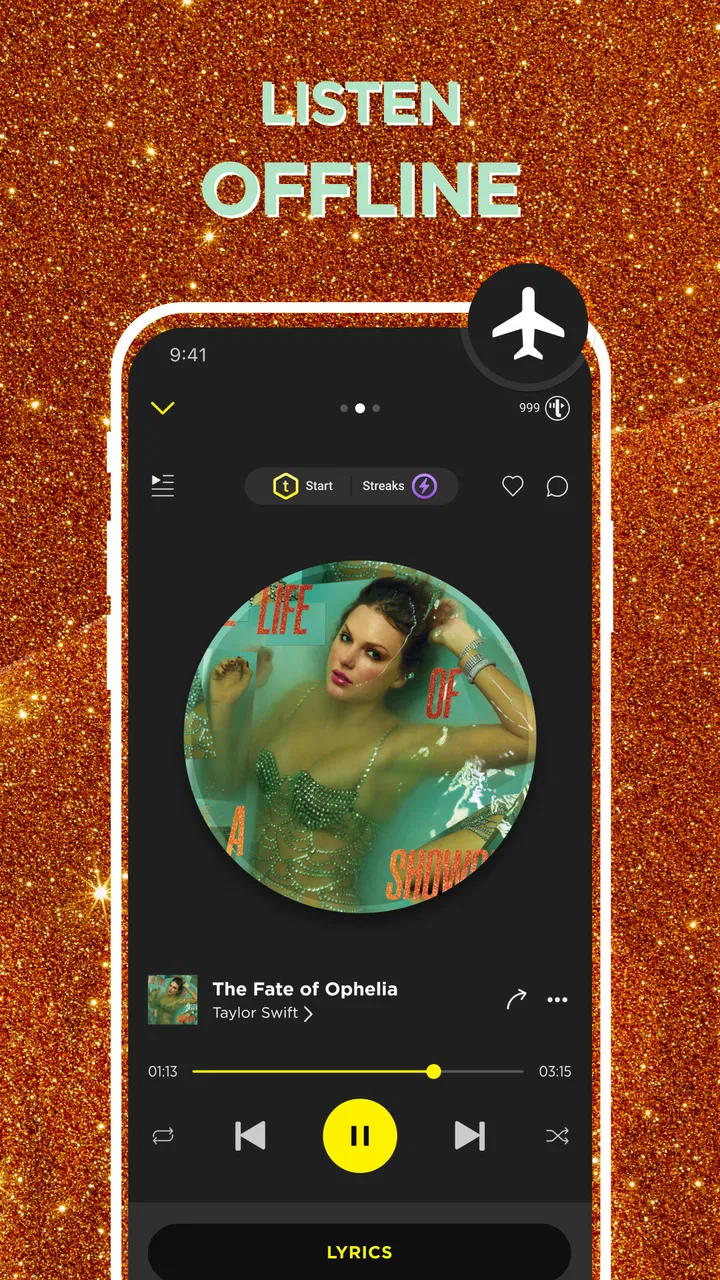
That distinction matters because “offline music” can mean different things. Some listeners want temporary downloads connected to a subscription. Others want a more direct library experience, where saved tracks feel like part of a personal collection and can be played when mobile data is limited. TREBEL is designed around the second kind of expectation, although the exact experience still depends on the app’s available catalog and how much content you choose to save.
I also considered how much patience the app asks for. A free service can be a good bargain, but the trade-off may appear through advertising, prompts, or a less seamless path from discovery to playback. I would not install it expecting the same quiet, uninterrupted flow as a paid premium service. I would install it because the free entry point and offline focus solve a specific problem.
For a commuter, student, traveler, or anyone trying to reduce mobile data use, that problem is very real. I can imagine preparing a few playlists before leaving home, then relying on them during a train ride or in an area with poor reception. The useful habit is to download while connected to stable Wi-Fi, check that the tracks appear in the offline area, and avoid waiting until the last minute. That small workflow makes the app much more dependable than simply assuming a playlist will be available later.
What the first setup tells you
During initial use, I would pay attention to whether the app’s organization matches my listening habits. TREBEL combines discovery, playlists, saved music, and an MP3-oriented player, so it is not only a search box. That combination is convenient when I want to move from finding something new to building a listening queue without switching applications.
The interface makes the most sense if I treat it as three connected areas. Discovery is where I browse ideas and trending selections. Saved content is where offline listening becomes useful. The player is where I manage the actual listening session. Keeping those roles separate helps prevent a common mistake: finding a song and assuming it is already ready for offline use. I would always verify the saved state before leaving a reliable connection.
Another practical decision is how much of my library I want to recreate. If I already have years of carefully organized playlists in another service, moving everything can be tiring. TREBEL is easier to justify when I am starting a smaller offline rotation: workout music, a commute playlist, background listening, or a handful of favorite collections. The lower the switching burden, the more attractive the app becomes.
Where the free model helps
The strongest advantage is obvious but meaningful: the app is free to install and use, while optional in-app purchases range from $0.49 to $49.99 per item. That gives me a way to test the core experience before deciding whether any paid extras are worthwhile. I would start without spending money, learn how the catalog and offline workflow suit me, and only then consider an optional purchase.
Free access is especially useful for a secondary device. An older Android phone can become a dedicated music player for a child, a car, or travel, provided it meets the minimum operating-system requirement. I would still check storage before saving a large collection, because offline audio turns available space into a practical limitation even when the app itself costs nothing.
The free model also changes how I judge small annoyances. If I encounter advertising or an occasional prompt, I compare that inconvenience with the cost of maintaining a premium subscription elsewhere. That does not mean every interruption is acceptable. It means the right comparison is not “free versus perfect”; it is “free and useful versus paying for a smoother experience.”
Where TREBEL wins in everyday use
In my experience, the app’s best case is a listener who wants a ready-to-go offline rotation without building a complicated technical setup. The combination of music discovery, downloadable listening, playlists, and an MP3-style player gives it a practical shape. I can search for something, add it to a useful collection, and return to that collection when I am away from dependable connectivity.
That is different from using a general file manager and a separate audio player. With local files, I would need to find music elsewhere, organize folders, transfer them, and make sure the player recognizes everything. TREBEL brings those steps closer together. It is not necessarily the best solution for someone with a large existing MP3 archive, but it is more approachable for someone who wants less manual file handling.
Discovery is another area where it earns its place. A personal library can become repetitive, especially when I only listen to familiar albums. Trending playlists and curated selections give me a starting point when I want something new but do not know exactly what to search for. I would use those sections as a source of ideas rather than assuming every recommendation will match my taste.
One useful tactic is to separate discovery playlists from dependable playlists. I might save a trending collection for exploration, then create a smaller offline group for the songs I know I will actually play. This prevents my downloads from becoming a cluttered archive and reduces the chance of discovering, at the worst possible moment, that the music I wanted was never saved.
A realistic commute workflow
Imagine I am leaving for a long day with limited data. The night before, I open TREBEL on Wi-Fi, browse a few suggested playlists, and choose a compact group for the morning commute. I then prepare a second, calmer selection for work and a third one for the trip home. Before leaving, I open the saved area and test playback with connectivity turned off or unavailable. That final check is more important than it sounds because it confirms that I am not depending on a live connection.
Once outside, I use the player rather than continuing to browse. This saves battery compared with repeatedly searching and reduces the temptation to stream something that I forgot to prepare. If I want variety, I can rotate between the offline groups I already checked. The app is most useful here not because it eliminates planning, but because it makes a small amount of planning worthwhile.
For a student, the same approach works around a campus with inconsistent reception. For a traveler, it can provide a familiar listening routine during parts of a journey where connectivity is expensive or uncertain. For a household, it can be a low-cost way to give someone a straightforward music app without immediately committing to a recurring subscription.
Small details that improve the experience
I would keep the offline library intentionally selective. Saving everything that looks interesting creates two problems: it consumes more storage and makes the player harder to navigate. A rotating collection is easier to maintain. Every few weeks, I would remove playlists I no longer use and replace them with new discoveries.
I would also use playlists by situation rather than by vague mood alone. “Morning commute,” “long walk,” or “no-signal backup” is more useful than a collection whose purpose I forget. This is a simple organizational choice, but it makes TREBEL feel more like a dependable tool and less like an endless feed.
Finally, I would avoid judging the app from one short session. The real value appears after I have tested the complete loop: discover, save, confirm offline access, play, and refresh the collection. An app can look attractive during browsing yet fail to fit my routine if saving is confusing or if the player does not make my prepared music easy to reach.
Where the experience can feel less polished
The free approach inevitably requires compromise. I would expect the listening flow to feel less controlled than a premium, ad-free service, particularly when I am trying to start music quickly. Promotional elements or interruptions can be frustrating when I am already offline-minded and simply want to reach my saved tracks.
Catalog expectations also need to be realistic. No music app is equally strong for every artist, region, or niche genre. If a particular album is essential to me, I would search for it before investing time in rebuilding my playlists. This is one of the most important practical checks because an appealing offline feature is not enough if the music I care about is unavailable in the way I expect.
The MP3-player positioning may also create confusion for people who already manage a personal audio archive. If my goal is to play files I own, I may prefer a dedicated local player with detailed folder, tag, equalizer, or library controls. TREBEL makes more sense when I want discovery and offline access in the same app, not when I need a specialist tool for organizing a large private collection.
When another kind of app may fit better
I would choose a conventional subscription streamer when uninterrupted playback, synchronized playlists, and a highly refined multi-device experience matter more than avoiding a monthly commitment. Those services are often better for someone who moves constantly between a phone, tablet, computer, car system, and smart speaker. TREBEL is more compelling when the phone itself is the main listening device and offline preparation is a central requirement.
I would choose a dedicated local music player when I already have a carefully tagged MP3 library. A specialist player may offer more control over folders, metadata, sorting, and playback behavior. In that situation, TREBEL’s discovery features may be unnecessary, and importing my existing habits into a new service could take more effort than it saves.
I would also think twice if podcasts are my main reason for installing it. TREBEL is presented as a music and audio app that includes podcasts in its identity, but my decision would depend on whether its podcast browsing and listening workflow suit me as well as its music features. Someone who primarily wants episode management, automatic downloads, playback speed controls, and detailed podcast organization may be happier with an app built specifically around podcasts.
Families should consider the Teen content rating before handing the app to younger children. That rating does not tell me how every individual item will feel to every household, so I would make the decision based on the listener’s age and the family’s own expectations. For an older teen, the app may be a convenient free option; for a child, I would look more closely at the overall listening environment first.
The real cost of switching
Money is only one part of the decision. The bigger cost may be rebuilding playlists, learning a new navigation pattern, and checking whether the saved library behaves the way I expect. If I have already invested years in another service, I would not switch completely just because TREBEL is free. I would test it as a companion first.
A gradual approach works well. I could install it, create one short offline playlist, and use it for a week of commuting. That test answers the questions that matter: Is discovery useful to me? Can I find saved music quickly? Does the free experience interrupt me more than I can tolerate? Does the available selection justify the effort of moving more of my listening?
If the trial works, I would expand in stages instead of copying my whole library at once. Start with the playlists that solve a clear problem, such as travel or low-data listening. Keep the old service for everything else until TREBEL proves that it can handle my daily routine. This approach limits frustration and makes the comparison fair.
The optional purchase range also argues for restraint. Because the app is free to begin with, I would not pay for extras simply to make the installation feel complete. I would first identify the exact inconvenience an in-app purchase addresses and decide whether that improvement matters to my use. A purchase is easier to justify when it removes a repeated annoyance, not when I am still unsure whether the app belongs in my routine.
Who should install it, and who should skip it?
I would recommend trying TREBEL if you want a free music app with an offline focus, enjoy discovering playlists, and mainly listen from one Android device. It is also worth considering if you are trying to cut mobile data use, need a backup music option for travel, or want something less manual than transferring files into a separate MP3 player.
I would skip it if I require a completely interruption-free experience, depend on a very specific catalog, or already have a well-organized local library that a specialist player handles perfectly. I would also hesitate if my listening is mostly podcast-based and I need advanced podcast management more than music discovery.
My final recommendation is to treat TREBEL as a practical second option rather than assuming it must replace everything. Its free price, offline-oriented workflow, and mix of discovery and playback make it genuinely useful for the right listener. The smartest test is small and concrete: prepare one playlist on Wi-Fi, confirm that it plays when connectivity is unavailable, and use it during a real commute or walk. If that experience feels natural, the app has earned a place on your phone. If the interruptions, catalog gaps, or organization do not suit you, a premium streaming service or dedicated local player will likely be the better choice.
FAQs for TREBEL: Music, MP3 & Podcasts
01Is TREBEL: Music, MP3 & Podcasts free to use?
Yes, TREBEL is free to use. The app allows users to download music and podcasts without any subscription fees. However, it is ad-supported, so users will encounter ads during usage. This model allows TREBEL to offer a vast library of music and podcasts without charging users directly.
02Can I listen to music offline with TREBEL?
Absolutely! One of the standout features of TREBEL is the ability to download songs and podcasts for offline listening. This means you can enjoy your favorite tracks and episodes without needing an internet connection, making it ideal for travel or areas with limited connectivity.
03What types of music and podcasts are available on TREBEL?
TREBEL boasts a diverse library that includes various music genres such as pop, rock, hip-hop, and classical, as well as a wide range of podcasts. Whether you're in the mood for the latest chart-toppers or niche podcast content, TREBEL provides ample choices to suit different tastes and preferences.
04Does TREBEL consume a lot of data?
While streaming music and podcasts does consume data, TREBEL’s offline feature helps mitigate this by allowing you to download content over Wi-Fi. This way, you can enjoy your media without continuously using mobile data, which is especially beneficial for users with limited data plans.
05Is the music quality on TREBEL good?
Yes, TREBEL offers high-quality audio streaming and downloads. The app ensures that users enjoy a rich listening experience with clear sound. However, the quality might vary slightly depending on the internet connection during streaming, but downloaded content maintains consistent quality.
Pros
- Offline listening available for free.
- Extensive library of popular tracks.
- User-friendly interface design.
- No subscription fees required.
- Allows playlist customization.
Cons
- Ads can interrupt listening experience.
- Limited offline downloads for certain songs.
- Not all tracks are available offline.
- Requires account registration to use.
- Some features need stable internet connection.

TREBEL: Music, MP3 & Podcasts
Gallery